Pick a list
Due today shows your follow-ups due and overdue. My leads has your leads with their filters, and Search is Carrier Search, compact. Open a lead from any of them.
The side panel
The SplitNextLane side panel is a Chrome extension that shows the lead you are calling beside your dialer, on the same tab. It types the number and your message, logs the call and opens the next lead, and it is included with Core for every user.
What it is
Open it on your dialer’s tab and it finds your workspace from your SplitNextLane sign-in. The lead, its numbers, one-click outcomes, your text templates and notes sit on the right; your dialer stays where it is.
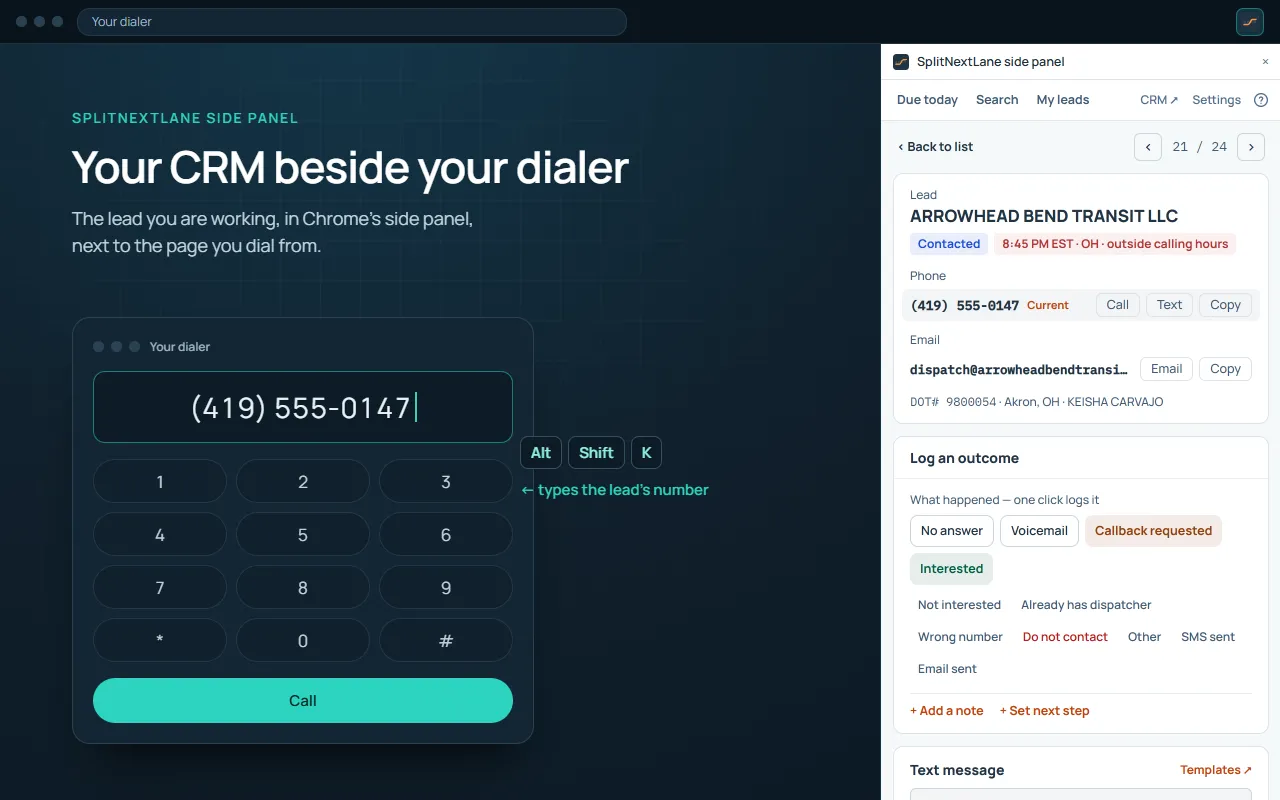
Every key copies the number or message, and with “Shortcuts also type at the cursor” on, it also types it where your cursor is, as a paste would. With a desktop dialer, or on a page Chrome protects, the key copies and you paste. Every key can be changed in Chrome.
A calling block in the panel, from the first lead to the last, without switching tabs.
Due today shows your follow-ups due and overdue. My leads has your leads with their filters, and Search is Carrier Search, compact. Open a lead from any of them.
No answer, voicemail, interested: one click logs the outcome, with your note and next step. It lands in the CRM at once, where your Manager sees it.
Alt+Shift+. opens the next lead in the list you opened, and Alt+Shift+, the previous one. At the end of the list, the panel says so.
Logging each outcome, Log SMS sent, the next number, the next template and the next follow-up have no key until you set one in Chrome. Set one, and a log by key is the same as a click.
The message key types your SMS template, filled in for the carrier. Choose which templates the panel offers, and their order, in its Settings.
It is part of Core, for every Manager and SDR in your workspace, at no extra cost.
It does not read, control or automate your dialer or any other website, and it sends nothing on your behalf. It never presses Call or Send. It works with your SplitNextLane account only. How it handles data · The Terms
From the Chrome Web Store, like any extension.
Any dialer you use in a Chrome tab. Every key copies the number or message, and with “Shortcuts also type at the cursor” on, it also types it where your cursor is, as a paste would. With a desktop dialer, or on a page Chrome protects, the key copies and you paste. With a desk phone or a mobile, the panel still shows the numbers and logs the call.
Add it to Chrome, open your dialer’s tab and press the extension’s icon: the panel opens on that tab and finds your workspace from your Split Next Lane sign-in. The Install the side panel guide has every step.
It does not read, control or automate your dialer or any other website or software, and it sends nothing on your behalf. It never presses Call or Send. When you press one of its keys, it copies the number or message and, if you have that setting on, types it where your cursor is. How you use your dialer is your choice and subject to your dialer’s own terms.
No. It is part of Core, for every user in your workspace.
Add the side panel to Chrome, and start a free trial of Core.