Open a carrier from Carrier Search to see its record before anyone is working it.
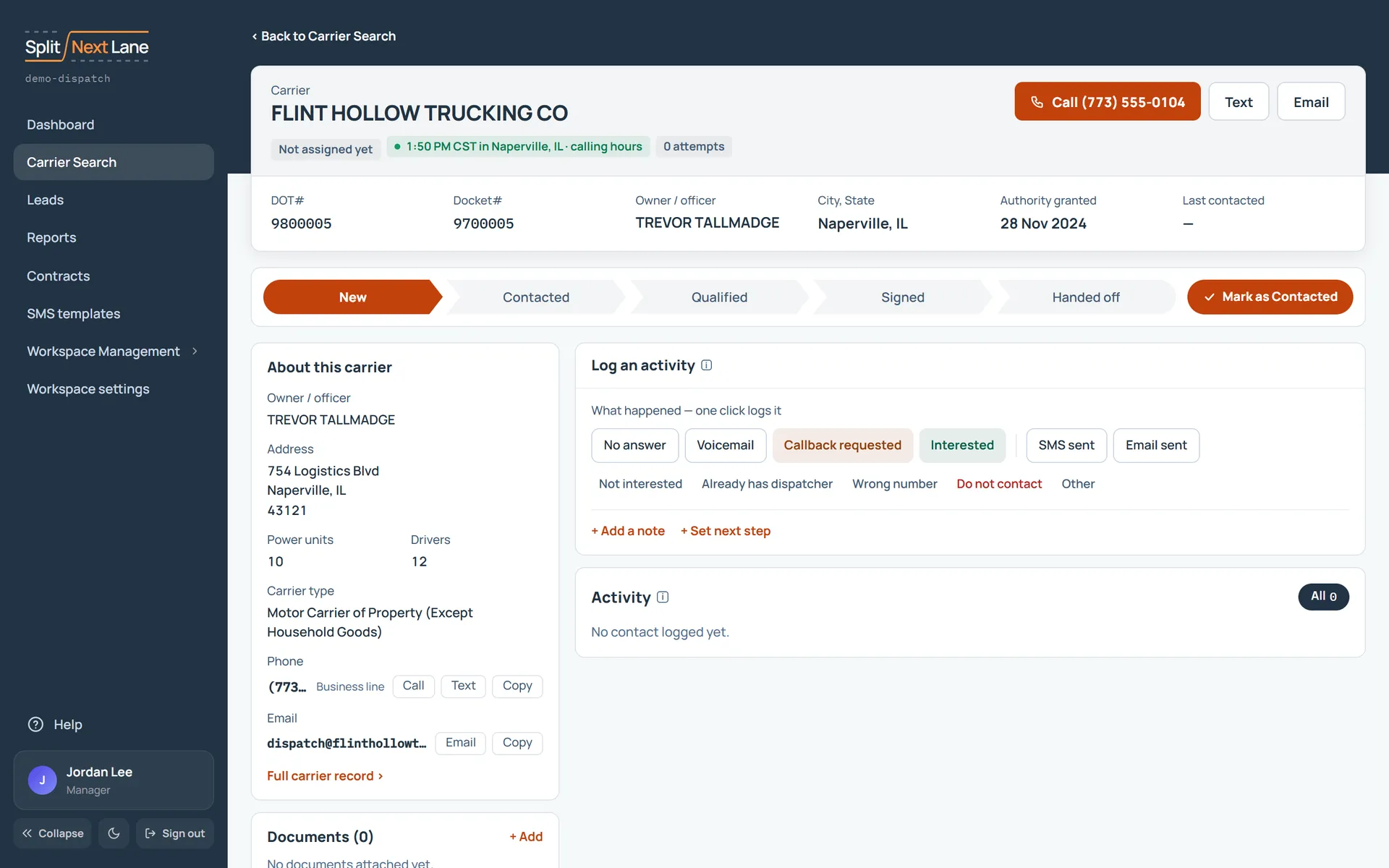
Make it your lead
Anything you log, note or move on this page makes the carrier your lead: one click on what happened on the call is enough. A Manager can also assign it to someone from Carrier Search.
If a teammate already holds it
You see who, and the page is read-only, so nobody calls the same carrier twice.
Step through your search
The arrows, or J and K, open the previous or next carrier in the search you came from.
On this page
The same steps the page’s tour shows the first time you open it. Replay it any time from Help.
- A carrier from your search
A carrier nobody is working yet. Anything you log, note or move here makes it your lead. If a teammate already holds it, you see who, and the page is read-only.
- Back and next
Go back to your search, or step to the previous or next carrier with the arrows (or J and K).
- Call, text, email
Call, Text and Email use the carrier's own number and address. What they open is your choice in your profile.
- Log what happened
One click on an outcome logs the call. Logging here makes the carrier your lead.
- About this carrier
The carrier's public record: numbers, email, address and officers. A link opens the carrier's page on the government's public register in a new tab.
Something missing, or a way this page could work better for you? In the product, open Help and choose Suggest a feature. We read every suggestion.