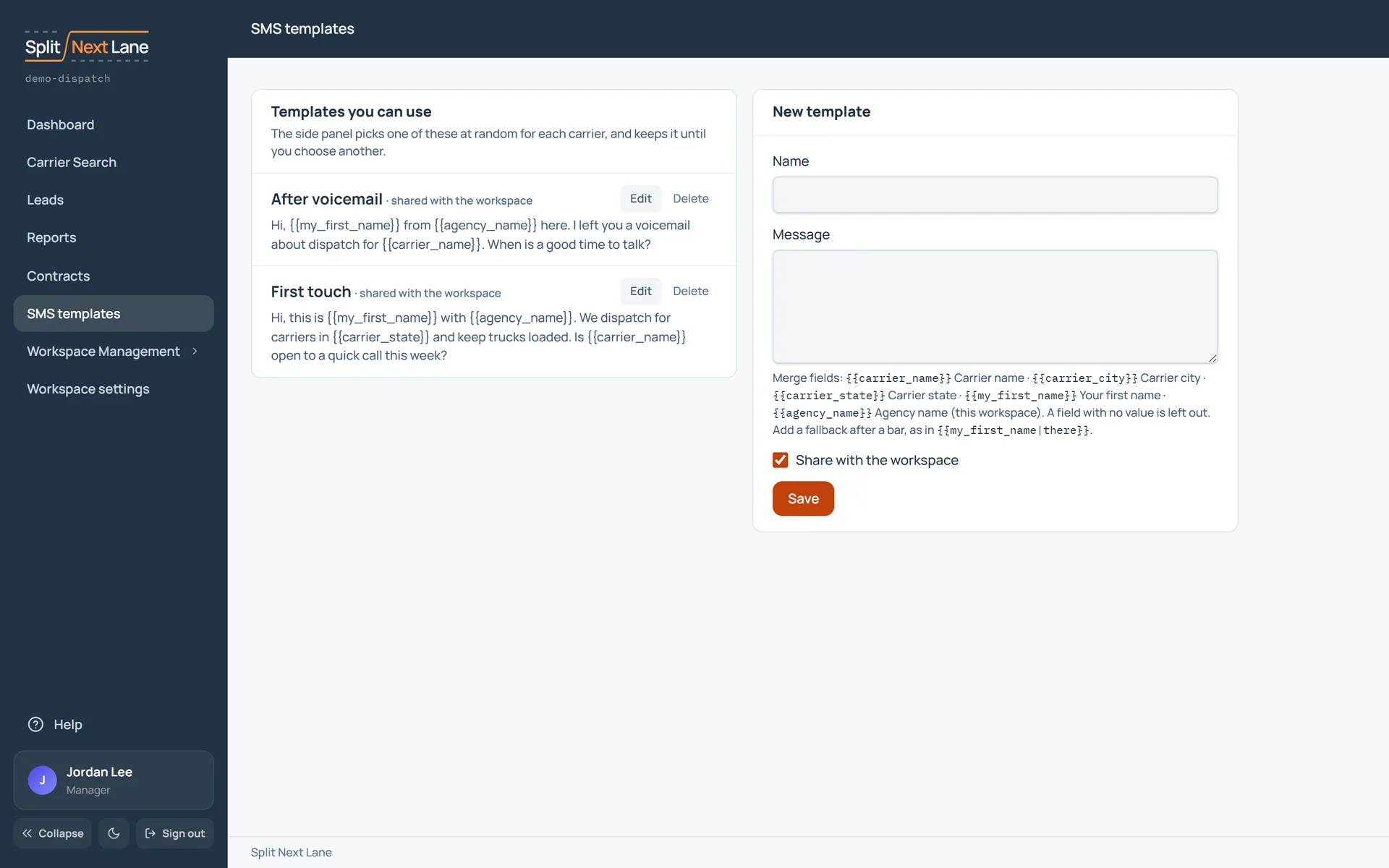
Open SMS templates from the menu on the left. These are the messages the side panel offers when you text a carrier.
Write one
Give it a name and write the message. Merge fields fill in for each carrier: {{carrier_name}}, {{carrier_city}}, {{carrier_state}}, {{my_first_name}} and {{agency_name}}. Add a fallback after a bar, as in {{my_first_name|there}}, for when a value is missing.
Shared or yours
A Manager’s template is shared with the workspace unless they untick Share with the workspace. Anyone else’s is theirs alone.
In the side panel
The panel picks one of your templates at random for each carrier and keeps it until you choose another. Choose which ones are in use, and their order, in the panel’s Settings. See The side panel: Settings.
On this page
The same steps the page’s tour shows the first time you open it. Replay it any time from Help.
- Your text messages
The messages the side panel offers. It picks one at random for each carrier and keeps it until you choose another.
- Write a template
Managers: Name it and write the message. Merge fields fill in the carrier's and your own details. Tick Share with the workspace to give it to everyone.
SDRs: Name it and write the message. Merge fields fill in the carrier's and your own details. Your templates are your own.
Something missing, or a way this page could work better for you? In the product, open Help and choose Suggest a feature. We read every suggestion.