A calling block in the side panel, from the first lead to the last. Open the panel on your dialer’s tab first: see Install the side panel.
Start with what is due
The panel opens on Due today: your follow-ups that are overdue or due today. Choose Next to open the first one. See The side panel: Due today.
Call and log
- Click into your dialer’s number box and press Alt+Shift+K. The lead’s current number is typed where your cursor is.
- Call from your dialer as usual.
- In the panel, click what happened: No answer, Voicemail, Interested and the rest. One click logs the call. To save a note or a next step with it, add them first.
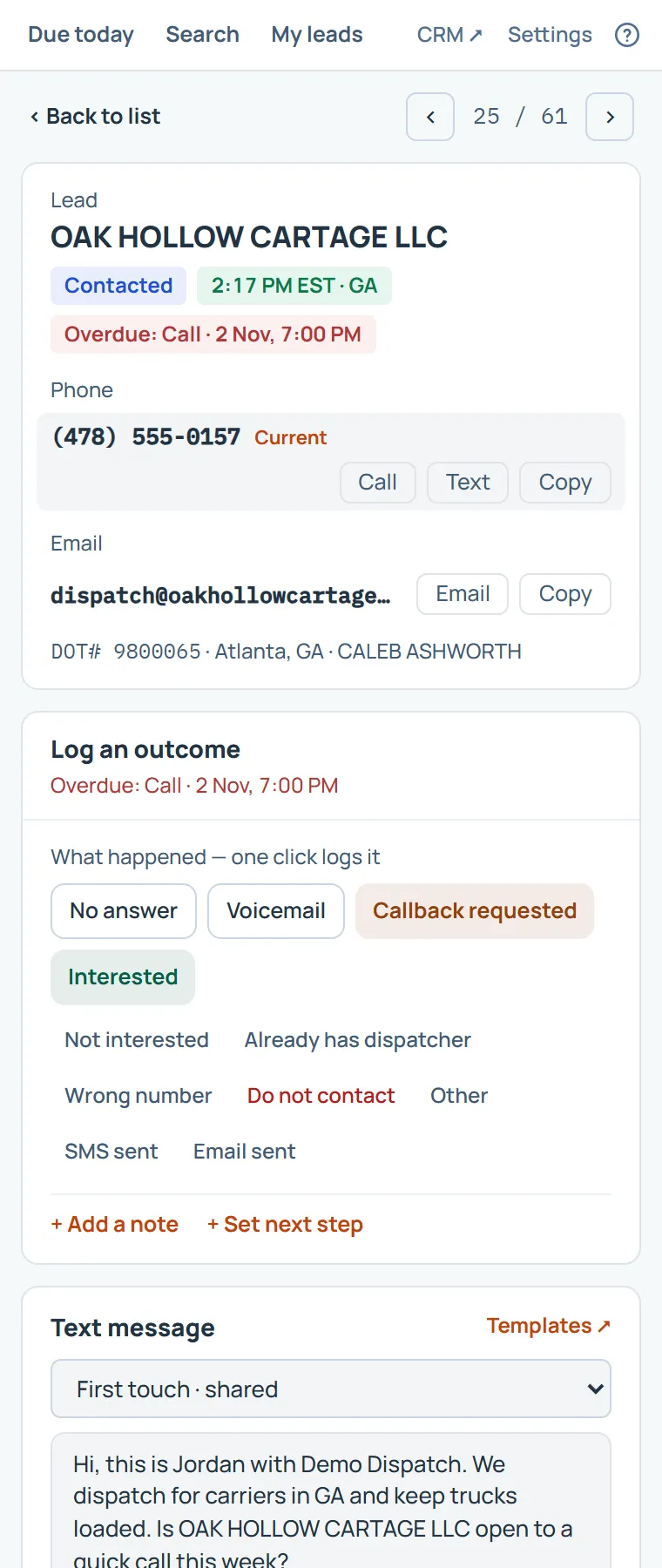
Send a text
If you text, the panel fills in one of your templates for this carrier. Click into your dialer’s message box, press Alt+Shift+M, send it from your dialer, then choose Sent in the panel to log it.
Move on
Press Alt+Shift+. for the next lead, and Alt+Shift+, to go back. Everything you logged is already in the CRM.
Faster still
Give the outcomes their own keys, and a setting can open the next lead after each log. See Working without the mouse.
Something missing, or a way this page could work better for you? In the product, open Help and choose Suggest a feature. We read every suggestion.